
Twin Peaks Oscillator for TradingView
- Secure checkout — all transactions encrypted
- Instant digital delivery after checkout
- Support: CustomerService @ PriceIsKing.com
- Reach out to us with any questions.
Everything included with your purchase
TradingView Indicator · Invite-Only
Know when to act, which way to lean, and where the setup is wrong — on one chart.
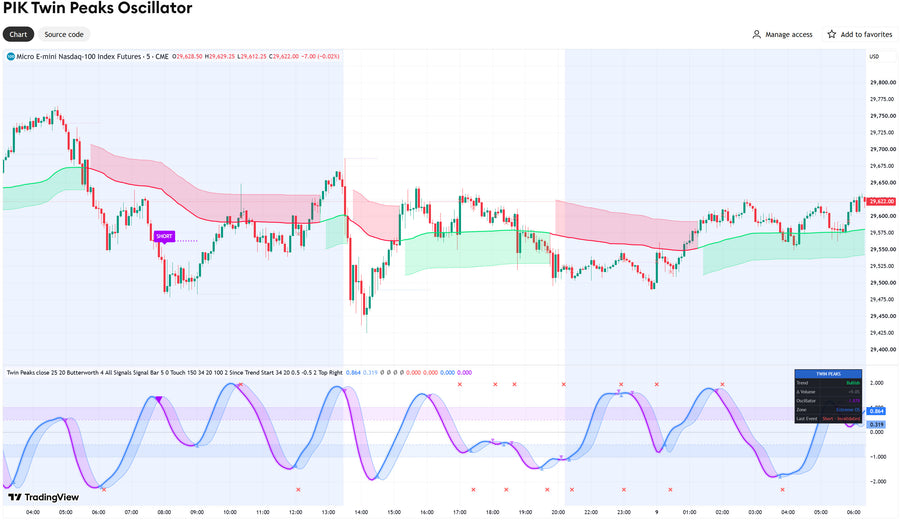
Most oscillators hand you a crossover and leave the rest to you. Twin Peaks Oscillator combines a noise-filtered two-pole momentum oscillator, dotted invalidation levels projected from every signal, and a volume-weighted VIDYA trend ribbon. A signal only becomes a qualified setup when all three agree.

Three questions, answered on the chart
What you get
- Two-pole oscillator — Butterworth or dual-pole EMA filtering, with a signal line and ±0.5 / ±1.0 overbought and oversold zones.
- Qualified vs. raw signals — full-color triangles for setups that pass every filter, dimmed triangles for the ones that don't.
- Invalidation levels — anchored to the signal candle or the swing extreme, with an optional ATR buffer and touch or close-beyond triggering.
- VIDYA trend ribbon — a 34-period, volume-weighted adaptive average with ATR trailing bands, drawn right on your price chart.
- Delta Volume filter — measured since the trend began or over a rolling window, with an adjustable threshold (20% by default).
- Entry delay — the entry triggers a set number of bars after the signal (2 by default) and cancels automatically if the setup fails first.
- Seven alerts — entries, qualified setups, raw signals, and invalidations, plus detailed webhook-ready messages with entry price and invalidation level.
- Live dashboard — trend, Delta Volume, oscillator reading, zone, and the status of your last setup at a glance.
- Fully adjustable — every length, threshold, filter, and color is in the settings window.

How a setup qualifies
Long
Buy crossover below +0.5
VIDYA ribbon green
Delta Volume ≥ +20%
Short
Sell crossover above −0.5
VIDYA ribbon red
Delta Volume ≤ −20%
All thresholds are adjustable. Tighten the levels to −0.5 / +0.5 for reversal-only setups.
Read the complete user guide
How every component works, the full settings reference, alert setup, and how traders use it.
Open the User Guide →How access works
Twin Peaks Oscillator is an invite-only TradingView script. There's nothing to download or install.
- Complete your purchase.
- Send your TradingView username (your profile name, not your email) through our contact form.
- We add the script to your TradingView account.
- In TradingView, open Indicators → Invite-only scripts and add Twin Peaks Oscillator to any chart.
Works on TradingView web, desktop, and mobile.
Specifications

Good to know
Does it repaint?
Signals are based on confirmed bar closes. A crossover can flicker while a candle is still forming; once it closes, the signal is fixed. Set alerts to Once Per Bar Close.
What about symbols without volume?
Many forex and CFD feeds report no volume. There, Delta Volume counts up-candles against down-candles and is labeled "(proxy)". The volume filter can be switched off.
Do I get the source code?
No. It's a protected invite-only script, and every setting you need is adjustable from the settings window.
Questions before you buy? See the complete user guide or contact us.
Risk disclaimer: Twin Peaks Oscillator is an analytical charting tool for informational and educational purposes only. It is not financial, investment, or trading advice. Trading involves substantial risk of loss and is not suitable for every investor. No indicator predicts future price movement, and past performance is not indicative of future results. TradingView is a trademark of TradingView, Inc.; PriceIsKing.com is not affiliated with TradingView. PriceIsKing.com is a product of Vulture Data Solutions Inc.